


SINGAPORE, April 20, 2021 /PRNewswire/ — Huawei’s Petal Maps app today announced the launch of its ‘Head Up Display’ (HUD) navigation mode for Asia-Pacific market. Designed with safe and convenient driving in mind, the HUD mode projects essential navigation information onto the car’s windshield to keep the driver’s eyes on the road ahead, to reduce distractions and improve driving safety.
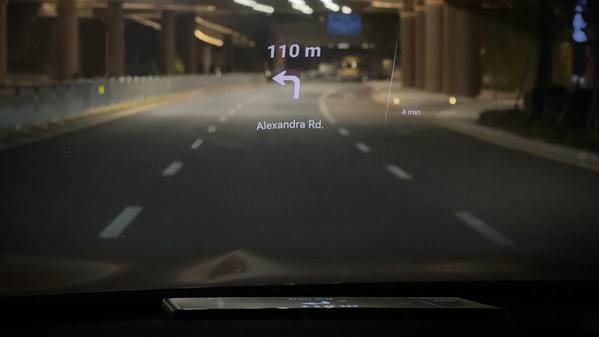
Designed for safety, the new HUAWEI Petal Maps’ Head Up Display will allow drivers to keep their eyes on the road while navigating.
First launched in October 2020, Petal Maps is the map and navigation app developed by Huawei Mobile Services (HMS). Available in more than 140 markets, Petal Maps was developed to provide location searches, turn-by-turn navigation and real-time traffic conditions for drivers – including tolls and traffic lights encountered on their preferred routes. Since its launch, the navigation app has been further enhanced to include route planning for walks, bike rides, as well as public transits, to help all users commute effectively.
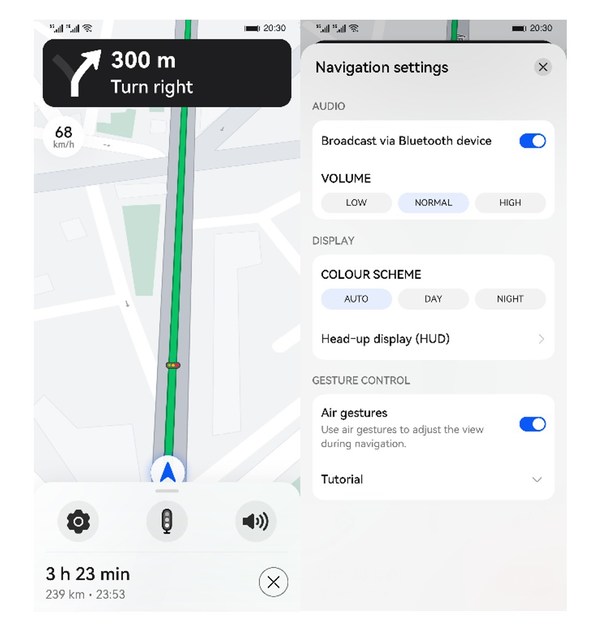
Enabling HUD mode in HUAWEI Petal Maps
Petal Maps’ latest update takes it a notch beyond, as it introduces its HUD mode to its list of features. Available as a free service to all users, the revolutionary safety feature uses the principle of optical refraction to project navigation information onto the windshield. Information such as speed and navigation directions will be displayed directly in front of the driver, helping drivers to view information while looking straight ahead without the need to looking down or turning his head on the phone screen.
To get started, initiate driving navigation in Petal Maps, slide up from the bottom status bar, click on the Settings icon, and select HUD. Then orient the phone screen to face the windshield, and touch the Projection button to mirror the screen on the glass. Mounting the screen on an in-car kit can produce better effects.
To download the app, please visit https://bit.ly/3thfmma.

Support Independent Community Journalism
Dear Reader,The Indian Sun exists for one reason: to tell stories that might otherwise go unheard.
We report on local councils, state politics, small businesses and cultural festivals. We focus on the Indian diaspora and the wider multicultural community with care, balance and accountability. We publish in print and online, send regular newsletters and produce video content. We also run media training programs to help community organisations share their own stories.
We operate independently.
Community journalism does not have the backing of large media corporations. Advertising revenue fluctuates. Platform algorithms change. Costs continue to rise. Yet the need for credible, grounded reporting in a multicultural Australia has never been greater.
When you support The Indian Sun, you support:
• Independent reporting on issues affecting migrant communities
• Coverage of local and state decisions that shape daily life
• A platform for small businesses and community groups
• Media training that builds skills within the community
• Journalism accountable to readers
We cannot cover everything, but we work to cover what matters.
If you value thoughtful reporting that reflects Australia’s diversity, we invite you to contribute. Every donation helps us maintain the quality and consistency of our work.
Please consider making a contribution today.
Thank you for your support.
The Indian Sun Team


